Tag Archives: ict

The importance of backing up your device

Many people use their computers or phones to store important documents, data and photos. However, not everyone correctly backs up their device to ensure the safe storage of this important data.

Knowing how to keep your data safe means you don’t have to worry about losing them during an update, if you misplace your device or even from internal and external threats. Take a look at what SMY IT Services recommend.

Decide on a reputable storage medium

When it comes to storing important files such as photographs or work documents, you shouldn’t just buy a hard drive or choose an online storage service simply because it is cheaper. When you decide to backup your device, you should research a brand and service that has a good reputation and also make sure it has the capacity to grow with you – that is enough capacity to store your files today and in a few years from now.
Buying storage is relatively inexpensive but seeking the advice of an IT expert means you can gather all the right information so that in the event that you need to restore – you can be safe in the knowledge you’ll get all your data back.

Regularly back up your device

Backing up your device frequently means that you will have all your files stored somewhere other than your original device. This means that if your original device gets lost or damaged, all your up to date documents and settings are safe. Online storage and backup is the most convenient way to ensuring your backup remains regular, useful and up to date.

Peace of mind

Having a copy of all your data means that if your device crashes, you won’t lose everything. Having your device backed up is also convenient if you need a copy of a file and you work regularly on a different desktop.
Taking your files with you means that you can work flexibly as well as keeping all your important documents safe.

Backing up your files not only provides easy access to your files, but will also reduce your stress if you lose them. Hopefully your computer will never crash, but in the case that it does, investing in a good quality backup solution will give you the added security to protect your business.

If you need advice on backing up your computer, feel free to contact SMY IT Services today.

Explained: IT storage, backup, disaster recovery and business continuity

As an IT specialist, we understand that getting the best hardware and operating system for your business is crucial. There are two major ones we can take a look at today – Microsoft and Apple. Both have advantages and disadvantages which set them apart from each other. To make things as easy as possible, we’ve set about our comparison below between the two.

We know not everyone is tech-savvy when it comes to IT and computing, including dealing with processes such as storage, backup, disaster recovery and business continuity. To eliminate any confusion, we’ve put together an article which should help straighten things out. Read more below.

Storage

All of your data needs to be stored securely. For example, if you’re writing a novel with a pen and paper, the paper in computing could represent a hard drive which is already in your computer, or external storage options such as a USB pen drive or the cloud.

In a digital world, you can have lots of versions of your data in different places. This means you can go back to previous copies if you make a mistake. However, stored data is not necessarily safe data. It is still at risk of deletion, either accidentally or through internal/external threats such as viruses, spyware or ransomware. This is why as well as (primary) storage, you should also have a backup (secondary or tertiary) system in place.

Backup

When backing up your files, all of your digital data, the operating system, configuration files and personal preference are all duplicated at set time intervals to another storage place. These set intervals are usually once a day. Therefore, should your current data get compromised, you will have backed up versions in a secondary place.

You can take this even further and do what’s called ‘replication’. This is essentially like a backup, but it shortens the time between backup intervals to near real-time. Both are integral in keeping your data secure in the event of a disaster.

Disaster recovery plan

Everyone loves a plan. Your disaster recovery plan should detail what steps are needed to restore your systems from backup.

It’s hard to think clearly in a time of crisis. Preparing it now can save a lot of time and pain later.

Your disaster recovery plan will clearly set out Recovery Point Objectives (RPO’s) and Recovery Time Objectives (RTO’s). This will include details about what order data and functionality will be restored and how much time it will take.

Business continuity

Business continuity works in conjunction with backup and the disaster recovery plan. These will detail alternative methods of functionality, while your main systems are recovered and restored from backups.

This ensures your business continues to run smoothly during a crisis.

If you need any advice on storage, backup, disaster recovery or business continuity, get in contact, we’d be happy to help.

Recruitment: what to look for in an IT provider

The recruitment industry is large and ever-growing in the UK. In fact, there has been a growth of 198% in 2013 – 2017 from 2008 – 2012 and it doesn’t show any signs of slowing down*. The fast-paced nature of the industry coupled with driven targets can make it a breeding ground for technology to go wrong. With this in mind, you need to ensure that your systems are safe, efficient and effective, so your employees can carry on working without interruption to the best of their ability.

Why do I need an IT service provider for my business?

Did you know that 46% of UK businesses suffered a serious data loss in 2016*? This could be due to any number of reasons from innocent power cuts to both internal and external threats. SMY IT have a disaster recovery package which covers every detail to make sure your business is prepared should the worst ever happen. A package like this is integral should something happen to your data whether its email, a CV or your CRM database. SMY IT have numerous partnerships with a range of providers such as Ekran System. This is a user monitoring and reporting software for threats inside and outside the workplace. Ekran System allows you to monitor your employees (in a CCTV style) as well as third-party providers. They also have a very quick incident response.

What should an IT service provider do for my business?

All service providers should do a full audit and run down of your systems both in the initial stage and at regular intervals. This is to find out where your security risks lie so they can ensure your systems are protected going forward. They can also then tailor packages best suited to your area of business. SMY IT are specialists in recruitment. With over 15 years of experience, they would be able to ensure protection of your systems with ease. Your service provider should be on hand 24/7. Should anything happen, day or night, your service provider should be available around the clock to speak to you, so they can rectify issues there and then. They should also be testing and monitoring your system constantly to deal with issues as they arise and well before you notice them. You should feel at ease that your service provider is certified with relevant experience. SMY IT for example are recognised by Microsoft for their expertise in the cloud platform and small/midmarket cloud solutions. They are also a direct Microsoft CSP (Cloud Solution Provider) partner. If you are in the recruitment industry and looking to get more out of your IT systems, contact SMY IT. *https://recruitmentbuzz.co.uk/uk-recruitment-industry-growing-rapidly/ *https://www.telegraph.co.uk/technology/2017/04/19/cyber-attacks-hit-half-uk-businesses-2016/

The importance of anti-spyware for your computer

Spyware is arguably one of the most dangerous types of malicious software in computing. This means it is really important to stay vigilant and protect your computer system from it. This especially goes for businesses, as you have a responsibility to protect the data of your clients.

What exactly does spyware do to my computer system?

The way the programme works is to gather your personal information without your knowledge or consent. They mostly exist to steal usernames and passwords as well as email accounts. Like a virus, a lot of spyware cannot be easily removed from a computer system. Some people may never be aware that spyware is on their computer. This is because it tends to work in the background of most systems.

What are the benefits of having anti-spyware software?

Anti-spyware software is intended to prevent and detect unwanted spyware and, consequently, removes them. Anti-spyware software will perform routine checks on your computer to ensure your system is safe. As well as this, it will also make sure your privacy is protected 24/7 from any possible intrusions.

There are a lot of programmes on the internet that can pose as well-established anti-spyware but are viruses themselves. You can usually tell the difference between genuine and fake anti-spyware. You can do this by running a simple review search on the internet of products.

What else can I do to prevent this?

One way to prevent this happening to you to is to make sure you run your IT systems through a reputable IT company, such as SMY IT. We can do all this work for you as well as providing valuable advice and answers to your questions.

If you’re worried about spyware on your computer, you can give SMY IT a call today to find out how we can help you.

10 top tips to keep your online accounts safe

World Password Day is a day to promote better password habits. Passwords are critical gatekeepers to our digital identities, allowing us to access online shopping, dating, banking, social media, private work and life communications.

Ten basic security tips:

  1. Give each account you have its own unique password — do not reuse any.
  2. Make every password complex and strong.
  3. Use a password manager. It remembers all your complex and strong passwords so you don’t have to.
  4. If you hear there’s been a breach, be extra safe and take action right away to change your passwords.
  5. Use 2-factor authentication. That way, even if your password is compromised, your account won’t necessarily be.
  6. Use a VPN (virtual private network), especially on public Wi-Fi.
  7. Never text or email anyone your password.
  8. When selecting security questions whilst creating an account, choose hard to guess options to which only you know the answer.
  9. Tell your family and friends to protect themselves too.
  10. If you don’t have one yet, get an antivirus program. If a threat somehow gets past your strong defences and into your system, a good antivirus will detect and remove it.

For more tips on how to increase your computer security, read our blog. Contact SMY IT Services to see how we can help you.

Jay Williams: Benefits of cold storage

As a society, we’re creating data at a truly unprecedented rate; an increased amount of extraneous data is an evident by-product of this. In fact, 95% of all data we create is only accessed within the first 90 days of its creation.

As a result of this, our storage media can become overburdened. The logical answer to this simply being the deletion of unneeded data at regular intervals. This, though, can lead to businesses within various sectors falling foul of regulators. Data is now often one of a business’s most valuable resources. Sadly, though, it is not always readily apparent what data will contain the information needed for these valuable insights leaving business owners with something of a conundrum: shoulder the cost of retaining this data or delete it and miss out on information that has the potential to be highly-beneficial. Cold storage provides a solution to this problem.

What is cold storage?

Cold storage is designed to retain files that need to be accessed sporadically. As a result, the speed that data is retrieved is much less of a concern. Instead, affordability, capacity and durability take precedent, meaning that the following are popular ways of storing cold data:

Magnetic tape

Until the late 1980s, magnetic tape was the de facto means of storing data. It remains a popular means of storing legacy data due to its robustness and low cost per GB of storage. A single tape capable of storing 15TBs, can be purchased for around £60. That makes it just 0.4 pence per GB.

Commodity hard drives

A commodity hard drive is basically a slower, more-affordable HDD. Commodity hard drives are known to be reliable and because of this, they are popular for storing cold data. They do work out to be considerably more expensive than tape, though. Western Digital offer a HDD, which is designed to store cold data. It costs approximately £110 and offers 4TBs of storage, equating to 2.75 pence per GB of storage.

Accessing cold data stored on a HDD is a quicker process than data that has been stored on a tape. In addition to this, a 1TB SSD is going to cost around £200, that’s 20 pence per GB.

Cold cloud storage

Companies that provide ‘virtual’ storage space are rife and offer lower cost space in their various data centres in exchange for slower transfer speeds. Cold cloud storage is extremely cheap and can cost less than a penny per GB under certain circumstances. This makes it an extremely popular option though, in our experience, our clients prefer to keep their most sensitive data offline for security reasons.

Conclusion

If your business is producing large amounts of data, it’s advisable you take action before your infrastructure begins to slow down. Decreased productivity and the need to purchase more expensive primary storage media could mean your bottom line is also affected.

Backing up your sensitive data to an offline device will also ensure increased security.

Bio:

Jay Williams is a communications office, employed by Fields Data Recovery. He has been with the company for more than a decade. In his spare time, he enjoys gaming, exercising and persistently attempting to convince his wife that their two-year-old daughter needs a Nintendo Switch.

Cloud computing 101: What you need to know

You might have heard the term ‘cloud computing’ being bounced around from various IT specialists and adverts. If you have no idea what it is or how it works, this article can help fill in the gaps for you.

You are probably already on the cloud without realising it! Cloud computing is the delivery of services over the internet. Apps such as Netflix, Amazon or Spotify depend on the cloud. It allows you to stream videos and music over the internet onto your device. If you have an Apple device, you are probably using the cloud to backup your data and photos.

We use the cloud to deliver services which, in our instance, help you run your business. We are a high-quality IT support, cloud & consultancy provider. This means that we can effectively design, manage and maintain your computer systems and services such as Email, Telephony, Backup and Disaster Recovery all  from the Cloud.

We use a mix best-in-class technology, and geeky passion for excellent service to provide resilient award-winning services.
Using an accomplished and experienced IT provider who specialise in the Cloud for your business gives you the advantage of managing data effectively and saving on costs freeing you up to get on with growing your business.

We tailor services specifically to your business to ensure you can operate how you want, when you want, for a price you want.

Why?

Cloud computing means you can run all of your programmes and applications without having to buy extra software or hardware. As a cloud solutions provider, we have a central hub of programmes and provide these to your employees through the cloud. Therefore, you won’t be forking out money or taking up desk space!

What is the cloud used for?

You can use the cloud to host websites, stream videos, software applications and much more. Cloud computing is quite mature already but had endless possibilities and capabilities. We predict that it will become the norm for a huge variety of businesses because of its many benefits. Cloud computing allows you to access, share and utilise your data from any device whether you have an internet connection or not! It also fits in with flexible working which allows employees to work from home at any given time.

Is it secure to use the cloud for my business?

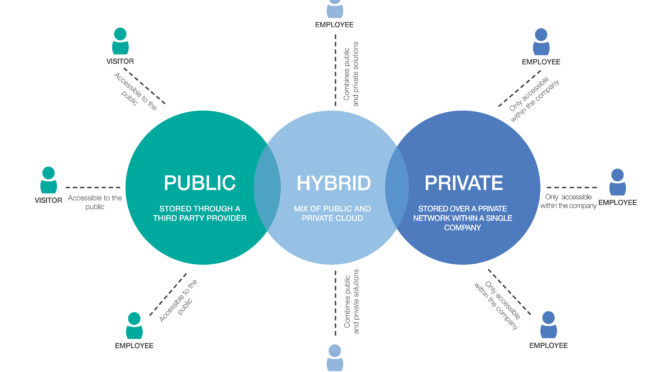
Not all clouds are the same, they can be public, private or hybrid. Third parties own public clouds and share them among lots of different companies. Meanwhile, a private clouds are accessed over a private network and operated by a single company. A hybrid cloud combines both public and private clouds together,  allowing businesses greater flexibility as well as more deployment options.

Choosing SMY IT as your cloud service provider means that we will be with you every step of the way. Whether it’s your first time setting up cloud computing or not, our aim to manage your computer system effectively and create a solution to suit your needs. Contact us to find out how we can help.

How our Microsoft Silver status will benefit you

Due to our expertise in the cloud, we have once again received the Microsoft Silver Partner accreditation. As a result of this, we’re one of only a handful of providers in the UK which has the experience and competence to deliver first-class cloud solutions.

How does this benefit you?

A Microsoft silver accreditation is awarded to companies who have “demonstrated expertise in quality solutions in one or more specialised areas of business”. Our ‘specialised areas’ are the cloud platform, as well as small and midmarket cloud solutions. To achieve Microsoft Silver Partner status we passed many evaluations, including:
  • technical assessments and exams
  • provide customer references
  • employing Microsoft Certified engineers
  • increase our customer base
  • positive customer feedback
Our distinction as a Microsoft Silver Partner means we receive emerging products, technologies and features while they’re still in the development cycle.  This allows us to work with our clients on certain platform upgrades and technology improvements many months before general release. To find out how we can help your business, give us a call.

What it means to be a Microsoft CSP partner

Whether your business is already utilising the Cloud or you are only just considering it, ensuring the company who provides your IT support is a Microsoft Cloud Solution Provider (CSP) partner can give you added security and reassurance that you are working with reputable professionals.

But what does being a Microsoft CSP partner really mean and how does that affect or help your business? Here are some handy FAQs.

What is a Microsoft CSP partner?

Being a Microsoft CSP partner means that we are accredited by undeniably, one of the biggest names in technology. This means that there are various standards which must be upheld. These includes providing reliable support as well as technical know-how. This ensures that we are there for our customers with the right solutions when they need it most.

SMY IT Services have gone one step further and achieved Microsoft silver partner status. Amongst other benefits (which is for another blog), this means we receive emerging products, technologies and features while they’re still in the development cycle. This allows us to work with our customers on platform upgrades and technology improvements many months before general release.

How does it benefit you as the customer?

There are many reasons why partnering with a Microsoft CSP partner for your computing needs provides an added benefit to you:

  • You get a flexible and simple monthly invoice for all your Microsoft services. Our pricing is cost-effective as your package will be tailor-made to you and your business’ needs
  • We can help you increase productivity with IT solutions that are customised to your requirements. This includes management and monitoring tools to minimise downtime and delays.
  • We are on hand to provide you with quality technical support when you just need an expert to take control

If you’d like more information we’d be happy to help. Get in touch with us today to find out what we can do for your business.