All posts by prominentpr

Five top tips to get on top of your inbox

Five top tips to get on top of your email inbox

Technology is continuing to evolve – and the days of communicating with clients via a letter, or even a face-to-face meeting, are becoming more uncommon. Email has been around for decades, although with the pandemic it has cemented itself as a prime form of communication.

But with so many emails coming and going, maintaining your inbox can be a difficult task.

Here are five of our top tips on how to keep on top of your work emails:

1.     Unsubscribe from emails that don’t apply to you

It is important to check previous emails you have received and decide whether you really need to keep receiving them.

Every email should have an “unsubscribe” button at the bottom of the text. Getting rid of subscriptions you don’t need won’t only save you stress, but also prolong the life of your system and save you money.

2.     Designate time to your emails each day

Keeping on top of a constant flow of emails throughout the day can be a daunting task. If you receive lots of emails every day, it might be more beneficial for you to allocate certain times of your day to read them.

This could be half an hour in the morning and another in the afternoon, for example.

3.     Highlight or mark emails that are yet to be completed

It can be easy to lose track of the important emails in your inbox when you receive a lot of emails. A good way to stop this is to mark key emails as unread, or to flag them. Flagging them has the added bonus of giving you a reminder when you check your inbox.

You can flag an email in Office 365/Microsoft Exchange by pressing the flag icon in the right-hand side of your email preview. It is also available at the top of the screen in “Tags” by pressing the “follow up” button.

Flagged emails will turn red and remain so until you turn it off. To set a reminder, press the follow up button and set a time to be reminded.

To unread your emails, simply press the button next to the follow up button that says “unread/read”.

4.     Use folders

There is much more to your email software than just an inbox and a sent items folder.

It is possible to create additional folders to help organise your emails on a day-to-day basis. You could also delegate your clients into different folders so you can access their emails more quickly.

Organising your emails through a good filing system stops your inbox from getting clogged – and can prevent important emails from being lost.

To make a folder in Outlook, right click on your “Inbox” on the left-hand side and click “New folder”.

5.     Consider email templates

This is a must if you send out a lot of the same emails – especially for those working in the recruitment or sales industries. Email templates will make targets much easier to reach.

You can create new templates using the “Signature” button.

To do so, write your email template in a new message, copy it and press the “Signature” button. From there, press “Signatures” and in the “Signatures and stationary window”, press new.

Now whenever you write a new message, you can just press the “Signature” button and select your email template.

Type in the name for your email template and paste your template into the dialogue box. You can only have one signature per email, so make sure to use the correct one for each email you send.

Find more tips and advice on our news page.


10 top tips to keep your online accounts safe

World Password Day is a day to promote better password habits. Passwords are critical gatekeepers to our digital identities, allowing us to access online shopping, dating, banking, social media, private work and life communications.

Ten basic security tips:

  1. Give each account you have its own unique password — do not reuse any.
  2. Make every password complex and strong.
  3. Use a password manager. It remembers all your complex and strong passwords so you don’t have to.
  4. If you hear there’s been a breach, be extra safe and take action right away to change your passwords.
  5. Use 2-factor authentication. That way, even if your password is compromised, your account won’t necessarily be.
  6. Use a VPN (virtual private network), especially on public Wi-Fi.
  7. Never text or email anyone your password.
  8. When selecting security questions whilst creating an account, choose hard to guess options to which only you know the answer.
  9. Tell your family and friends to protect themselves too.
  10. If you don’t have one yet, get an antivirus program. If a threat somehow gets past your strong defences and into your system, a good antivirus will detect and remove it.

For more tips on how to increase your computer security, read our blog. Contact SMY IT Services to see how we can help you.

Beware! Office 365 login phishing scam

Cyber crooks are taking advantage of changes to the layout and experience of the Office 365 login page to steal user credentials. Here, Jonathan Smy, managing director of IT support, cloud and consultancy provider SMY IT, explains how to protect yourself from the hackers.

A managing director of a large firm contacted us recently with a fairly major problem.

He received an email asking him to update his password and within seconds of obliging an email had been sent to his payments manager asking for a transfer to be made.

Never one to question the managing directors request, the payment was authorised. Moments later £10,000 had left the business account.

Meanwhile the managing director, who had sent no such email, could no longer access his Microsoft Office 365 email account and had rung us for advice.

Most people are familiar with phishing scams. These are email messages that pretend to be legitimate but instead infect your computer or harvest your passwords.

Some phishing scams are easy to avoid thanks to obvious grammatical errors or other red flags. Others, however, are so accurate they can even fool the experts.

In this particular case, the spammer obtained the login credentials through Microsoft Office 365.

The hacker replicated the layout for the original Office 365 login page. This meant the managing director had entered his user name and password without question.

He would have only noticed there was a problem if he had closely examined the www address bar at the top on the page.

Instead he made a very costly mistake – one any one of us could have made.

How can you protect yourself?

There are systems to try and protect against this type of threat but technology evolves every day. As a result of this, we need to stay vigilant.

Perimeter security such as firewalls are essential, but next generation firewalls add additional security services and are even better.

On top of this, we would urge people to question everything.

We advise people to slow down, ready emails carefully, be wary of differing fonts or text size. As well as this, we advise hovering over hyperlinks in both emails and websites before you click them to check the destination address.

Never use the same email address and password combinations online, change your passwords periodically and keep them long and complex where possible using upper and lower case, numbers and symbols.

Use a password manager to store and generate secure passwords. Do not write passwords down and use two-factor authentication where possible.

When being asked to pay money to someone, we advise making a phone call to verify the details.

For more advice or information contact us.

Jay Williams: Benefits of cold storage

As a society, we’re creating data at a truly unprecedented rate; an increased amount of extraneous data is an evident by-product of this. In fact, 95% of all data we create is only accessed within the first 90 days of its creation.

As a result of this, our storage media can become overburdened. The logical answer to this simply being the deletion of unneeded data at regular intervals. This, though, can lead to businesses within various sectors falling foul of regulators. Data is now often one of a business’s most valuable resources. Sadly, though, it is not always readily apparent what data will contain the information needed for these valuable insights leaving business owners with something of a conundrum: shoulder the cost of retaining this data or delete it and miss out on information that has the potential to be highly-beneficial. Cold storage provides a solution to this problem.

What is cold storage?

Cold storage is designed to retain files that need to be accessed sporadically. As a result, the speed that data is retrieved is much less of a concern. Instead, affordability, capacity and durability take precedent, meaning that the following are popular ways of storing cold data:

Magnetic tape

Until the late 1980s, magnetic tape was the de facto means of storing data. It remains a popular means of storing legacy data due to its robustness and low cost per GB of storage. A single tape capable of storing 15TBs, can be purchased for around £60. That makes it just 0.4 pence per GB.

Commodity hard drives

A commodity hard drive is basically a slower, more-affordable HDD. Commodity hard drives are known to be reliable and because of this, they are popular for storing cold data. They do work out to be considerably more expensive than tape, though. Western Digital offer a HDD, which is designed to store cold data. It costs approximately £110 and offers 4TBs of storage, equating to 2.75 pence per GB of storage.

Accessing cold data stored on a HDD is a quicker process than data that has been stored on a tape. In addition to this, a 1TB SSD is going to cost around £200, that’s 20 pence per GB.

Cold cloud storage

Companies that provide ‘virtual’ storage space are rife and offer lower cost space in their various data centres in exchange for slower transfer speeds. Cold cloud storage is extremely cheap and can cost less than a penny per GB under certain circumstances. This makes it an extremely popular option though, in our experience, our clients prefer to keep their most sensitive data offline for security reasons.

Conclusion

If your business is producing large amounts of data, it’s advisable you take action before your infrastructure begins to slow down. Decreased productivity and the need to purchase more expensive primary storage media could mean your bottom line is also affected.

Backing up your sensitive data to an offline device will also ensure increased security.

Bio:

Jay Williams is a communications office, employed by Fields Data Recovery. He has been with the company for more than a decade. In his spare time, he enjoys gaming, exercising and persistently attempting to convince his wife that their two-year-old daughter needs a Nintendo Switch.

Introducing Ekran System

As the General Data Protection Regulation (GDPR) looms, understanding who has access to a businesses data is increasingly important. If you believe that this could be an issue for you, we can help!  We can introduce you to Ekran System. It’s a screen recording, user monitoring/reporting and auditing software for both internal and external threats in your workplace.

What does Ekran System do?

Provides customers with an efficient, easy-to-use tool which addresses all monitoring needs as well as meeting security audit requirements.

When thinking about security, you might not necessarily think about your own employees being a threat. In 2016, 69% of surveyed businesses said they had experienced theft and corruption of sensitive data caused by internal users. These employees could be doing it for malicious intent, but it is also common for the individual to be naïve and impressionable.

Ekran System can record all privileged user systems and is capable of both application and internet monitoring. It can also provide several in-built access management tools. While still obeying industry rules and regulations it enables complete visibility into your IT infrastructure. The Ekran System can also be used to alert your security about potentially dangerous actions as they occur. A security specialist can block a user/ dangerous action if needed.

It also has the option to create complete video records of every user screen as well as activity details.

What are the benefits of Ekran System?

– Control and visibility of user activity
– Employee monitoring
– Third-party providers and contractors monitoring
– Suitable for businesses from all industry types
– Easy record archiving
– Quick incident response
– Enhanced record process protection
– Compliant with regulations
– Affordability

How can I get more information on introducing Ekran System to my workplace?

If you’re interested in adopting Ekran System, contact Smy IT Services and we’d be happy to help. We know the importance of security in your IT systems, and we are committed to giving you the best protection.

Cloud computing 101: What you need to know

You might have heard the term ‘cloud computing’ being bounced around from various IT specialists and adverts. If you have no idea what it is or how it works, this article can help fill in the gaps for you.

You are probably already on the cloud without realising it! Cloud computing is the delivery of services over the internet. Apps such as Netflix, Amazon or Spotify depend on the cloud. It allows you to stream videos and music over the internet onto your device. If you have an Apple device, you are probably using the cloud to backup your data and photos.

We use the cloud to deliver services which, in our instance, help you run your business. We are a high-quality IT support, cloud & consultancy provider. This means that we can effectively design, manage and maintain your computer systems and services such as Email, Telephony, Backup and Disaster Recovery all  from the Cloud.

We use a mix best-in-class technology, and geeky passion for excellent service to provide resilient award-winning services.
Using an accomplished and experienced IT provider who specialise in the Cloud for your business gives you the advantage of managing data effectively and saving on costs freeing you up to get on with growing your business.

We tailor services specifically to your business to ensure you can operate how you want, when you want, for a price you want.

Why?

Cloud computing means you can run all of your programmes and applications without having to buy extra software or hardware. As a cloud solutions provider, we have a central hub of programmes and provide these to your employees through the cloud. Therefore, you won’t be forking out money or taking up desk space!

What is the cloud used for?

You can use the cloud to host websites, stream videos, software applications and much more. Cloud computing is quite mature already but had endless possibilities and capabilities. We predict that it will become the norm for a huge variety of businesses because of its many benefits. Cloud computing allows you to access, share and utilise your data from any device whether you have an internet connection or not! It also fits in with flexible working which allows employees to work from home at any given time.

Is it secure to use the cloud for my business?

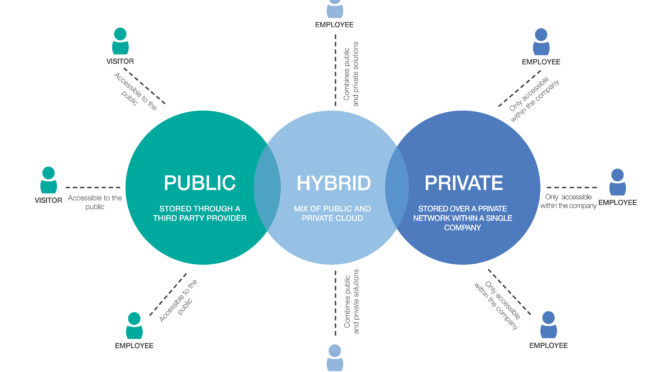
Not all clouds are the same, they can be public, private or hybrid. Third parties own public clouds and share them among lots of different companies. Meanwhile, a private clouds are accessed over a private network and operated by a single company. A hybrid cloud combines both public and private clouds together,  allowing businesses greater flexibility as well as more deployment options.

Choosing SMY IT as your cloud service provider means that we will be with you every step of the way. Whether it’s your first time setting up cloud computing or not, our aim to manage your computer system effectively and create a solution to suit your needs. Contact us to find out how we can help.

How our Microsoft Silver status will benefit you

Due to our expertise in the cloud, we have once again received the Microsoft Silver Partner accreditation. As a result of this, we’re one of only a handful of providers in the UK which has the experience and competence to deliver first-class cloud solutions.

How does this benefit you?

A Microsoft silver accreditation is awarded to companies who have “demonstrated expertise in quality solutions in one or more specialised areas of business”. Our ‘specialised areas’ are the cloud platform, as well as small and midmarket cloud solutions. To achieve Microsoft Silver Partner status we passed many evaluations, including:
  • technical assessments and exams
  • provide customer references
  • employing Microsoft Certified engineers
  • increase our customer base
  • positive customer feedback
Our distinction as a Microsoft Silver Partner means we receive emerging products, technologies and features while they’re still in the development cycle.  This allows us to work with our clients on certain platform upgrades and technology improvements many months before general release. To find out how we can help your business, give us a call.

What it means to be a Microsoft CSP partner

Whether your business is already utilising the Cloud or you are only just considering it, ensuring the company who provides your IT support is a Microsoft Cloud Solution Provider (CSP) partner can give you added security and reassurance that you are working with reputable professionals.

But what does being a Microsoft CSP partner really mean and how does that affect or help your business? Here are some handy FAQs.

What is a Microsoft CSP partner?

Being a Microsoft CSP partner means that we are accredited by undeniably, one of the biggest names in technology. This means that there are various standards which must be upheld. These includes providing reliable support as well as technical know-how. This ensures that we are there for our customers with the right solutions when they need it most.

SMY IT Services have gone one step further and achieved Microsoft silver partner status. Amongst other benefits (which is for another blog), this means we receive emerging products, technologies and features while they’re still in the development cycle. This allows us to work with our customers on platform upgrades and technology improvements many months before general release.

How does it benefit you as the customer?

There are many reasons why partnering with a Microsoft CSP partner for your computing needs provides an added benefit to you:

  • You get a flexible and simple monthly invoice for all your Microsoft services. Our pricing is cost-effective as your package will be tailor-made to you and your business’ needs
  • We can help you increase productivity with IT solutions that are customised to your requirements. This includes management and monitoring tools to minimise downtime and delays.
  • We are on hand to provide you with quality technical support when you just need an expert to take control

If you’d like more information we’d be happy to help. Get in touch with us today to find out what we can do for your business.