Tag Archives: office 365

Tech News : Microsoft Price Hikes

Microsoft has announced that from March 1st 2022, it will increase the prices of its Microsoft 365 and Office 365 subscription plans.

How Much?

Microsoft says that the price rises, which could be as much as 25 percent, will affect its commercial products in the following ways:

Microsoft 365 Business Basic, will rise from $5 to $6 per user (£3.63 to £4.36)

Microsoft 365 Business Premium will rise from $20 to $22 (£14.53 to £15.98)

Office 365 E1 will rise from $8 to $10 (£5.81 to £7.26)

Office 365 E3 will rise from $20 to $23 (£14.53 to £16.71)

Office 365 E5 will rise from $35 to $38 (£25.43 to £27.61)

Microsoft 365 E3 will rise from $32 to $36 (£23.25 to £26.15).

Microsoft points out that this will be “the first substantive pricing update since we launched Office 365 a decade ago”.

Why?

Microsoft says that the price rises reflect the increased value that it has delivered to its customers over the past 10 years. This includes its continuous re-investment in improving its products, the addition of 24 apps to its suites, the addition of 1,400 new features and capabilities. Also, four years ago, Microsoft launched 365 to bring together the best of Office, Windows, and Enterprise Mobility and Security (EMS) for its customers, and (the same year) it added Microsoft Teams as “the only integrated solution where you can meet, chat, call, collaborate, and automate business processes—right in the flow of work”.

The tech giant points to its innovative products and addition of value for customers in the three key areas communication and collaboration, security and compliance, and AI and automation as justification for next year’s price rise.

Something New Too

Microsoft is also using the introduction of its new unlimited dial-in for Microsoft Teams meetings across enterprise, business, frontline, and government suites as an extra justification for the price rises. Unlimited dial-in (available with subscription in over 70 countries and with interactive support in 44 languages and dialects) should eliminate difficulties in joining Teams meetings due to connectivity/patchy internet connection problems, thereby making it easier for users to join their Microsoft Teams meeting from virtually any device regardless of location.

What Does This Mean For Your Business?

This represents a considerable (and unwelcome) price hike for businesses in only 6 months-time, particularly for small businesses that have not been able to benefit from the bulk discounts that larger businesses have enjoyed over the years. With the Microsoft Office line being its biggest seller, bringing its revenue mostly from business customers who have used the products to help adapt to remote and hybrid working, Microsoft know that this price increase will now give a considerable boost to its revenue and profits and will allow it to expand its Office cloud business even more.

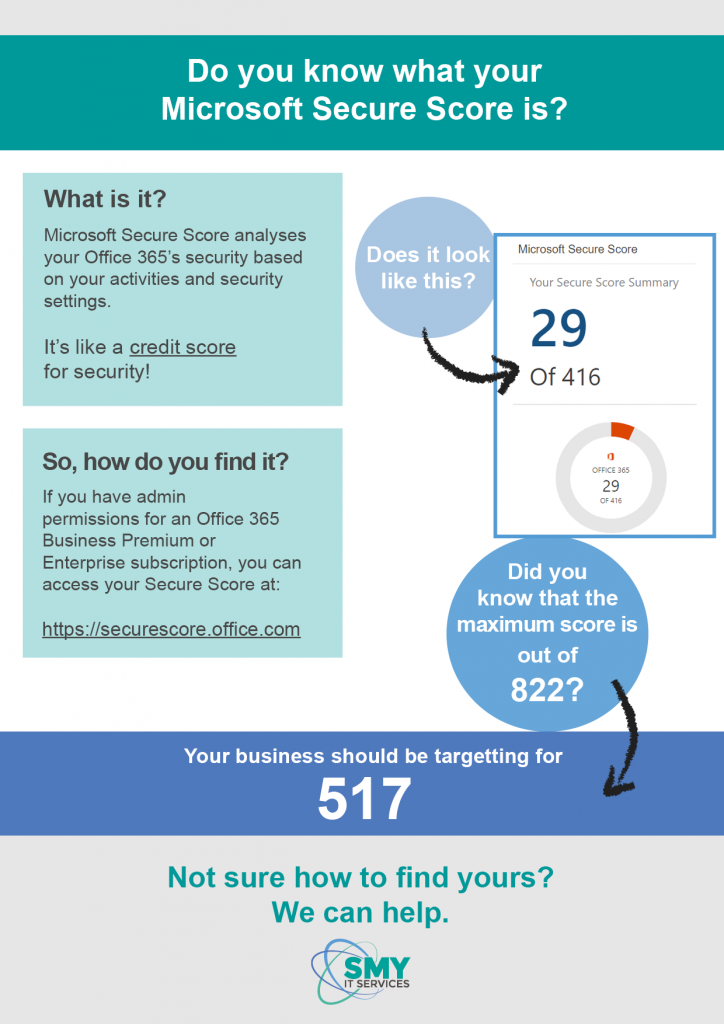
Do you know what your Microsoft Secure Score is?

Ever wondered how your IT security holds up?

In this day and age, cyber security or computer security, is one of the most important processes in place to ensure that your business can continue to function.

Therefore, you need to make sure yours is up to scratch. If not, you’ll be at risk of viruses, malware and spyware making its way through your systems. This could result in a loss of data or even fraud.

This year, Microsoft have introduced a ‘Secure Score’, which essentially measures how good your security is. It’s basically like a credit score for your IT security!

How does it work?

Microsoft Secure Score can analyse what Microsoft Office 365 applications you use (for example your Exchange email) and then looks at your settings and activity. Secure Score then pairs these up against their own Microsoft guidelines to give your business a score.

Depending on what applications you have, your usage, location and level of risk, the score will be out of a certain number. The highest you can have is 822.

Here’s an example for you:

Every company’s score is personalised depending on numerous factors. In general, the higher the better – but you should be striving to hit at least 65% of your target score.

Furthermore, Your Secure Score will tell you what steps you can take to improve your score and how to reduce your risk.

Surprisingly, you will most likely already have the security features you need to improve your score.  A lot of features are often included in Microsoft Office 365 packages.

How do I find out my Secure Score?

If you have admin permissions for an Office 365 Business Premium or Enterprise subscription, you will be able to access your Secure Score on the Microsoft website. If you don’t have an admin role, you won’t be able to access this.


Not sure how you can improve your Secure Score?

SMY IT Services can do the legwork for you! Our security packages are second to none, and we can help you in a variety of ways to ensure your business is protected. Get in touch with us today to find out how we can help increase your security.

Beware! Office 365 login phishing scam

Cyber crooks are taking advantage of changes to the layout and experience of the Office 365 login page to steal user credentials. Here, Jonathan Smy, managing director of IT support, cloud and consultancy provider SMY IT, explains how to protect yourself from the hackers.

A managing director of a large firm contacted us recently with a fairly major problem.

He received an email asking him to update his password and within seconds of obliging an email had been sent to his payments manager asking for a transfer to be made.

Never one to question the managing directors request, the payment was authorised. Moments later £10,000 had left the business account.

Meanwhile the managing director, who had sent no such email, could no longer access his Microsoft Office 365 email account and had rung us for advice.

Most people are familiar with phishing scams. These are email messages that pretend to be legitimate but instead infect your computer or harvest your passwords.

Some phishing scams are easy to avoid thanks to obvious grammatical errors or other red flags. Others, however, are so accurate they can even fool the experts.

In this particular case, the spammer obtained the login credentials through Microsoft Office 365.

The hacker replicated the layout for the original Office 365 login page. This meant the managing director had entered his user name and password without question.

He would have only noticed there was a problem if he had closely examined the www address bar at the top on the page.

Instead he made a very costly mistake – one any one of us could have made.

How can you protect yourself?

There are systems to try and protect against this type of threat but technology evolves every day. As a result of this, we need to stay vigilant.

Perimeter security such as firewalls are essential, but next generation firewalls add additional security services and are even better.

On top of this, we would urge people to question everything.

We advise people to slow down, ready emails carefully, be wary of differing fonts or text size. As well as this, we advise hovering over hyperlinks in both emails and websites before you click them to check the destination address.

Never use the same email address and password combinations online, change your passwords periodically and keep them long and complex where possible using upper and lower case, numbers and symbols.

Use a password manager to store and generate secure passwords. Do not write passwords down and use two-factor authentication where possible.

When being asked to pay money to someone, we advise making a phone call to verify the details.

For more advice or information contact us.